Websites
Add, switch between and delete websites, and what it means when your websites are paused.
You manage websites from the website switcher at the top of the sidebar. Each website has its own pages, Google data, content, notes and saved prompts. Your profile is shared across all of them.
Switch website
Click the switcher. It shows the current website's name and domain. Pick another website from the list. Meelu opens that website's Overview desk.
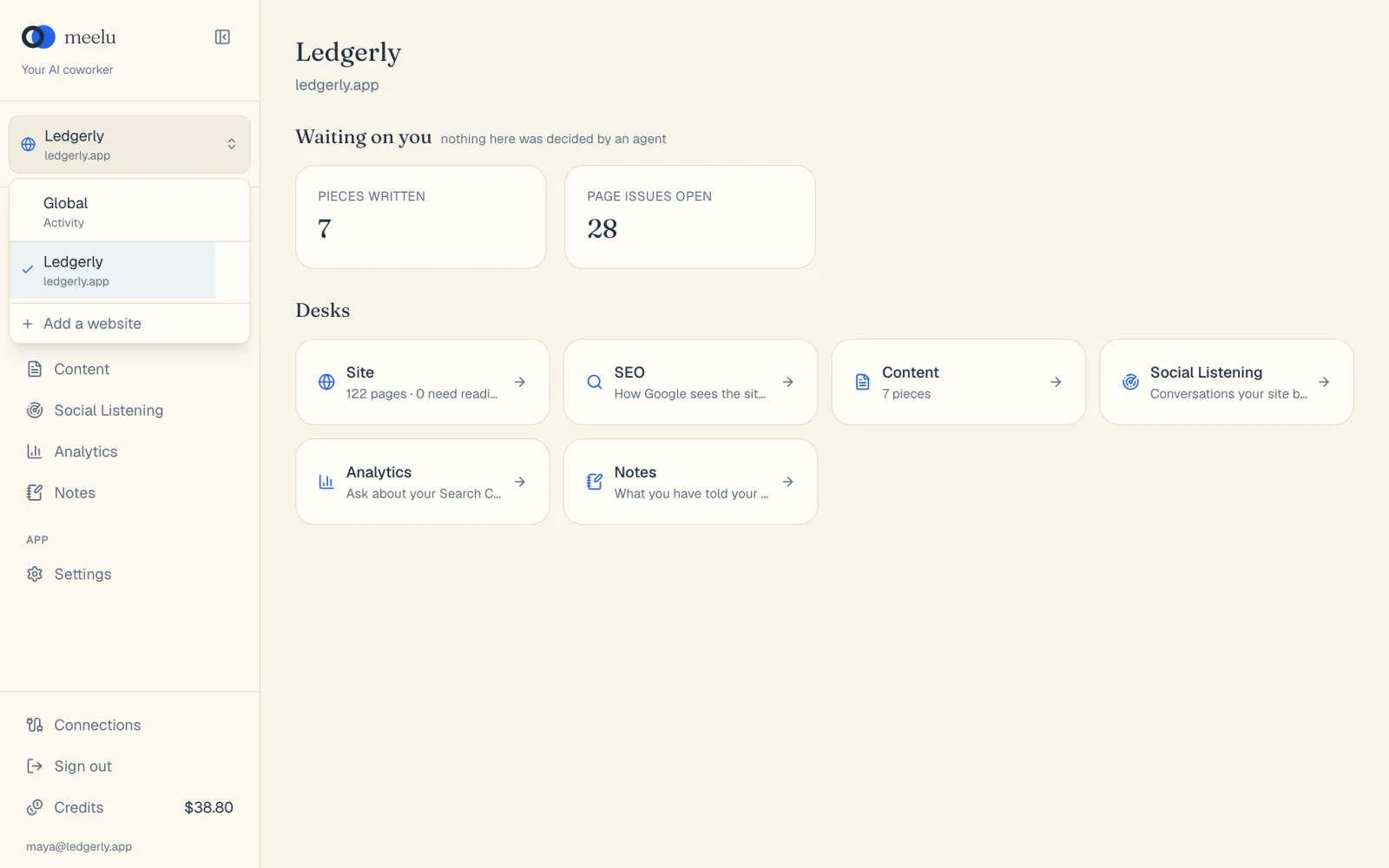
The list also has Global. Pick it for things that are not about one website, such as your profile. In Global, only the Settings screen is shown.
Add a website
Open the switcher
Click the switcher, then click Add a website at the bottom of the list.
Fill in the form
In Website, type the address your site serves on, including www if it uses it, such as www.example.com. In Business name, type the name you want to see in the switcher. In Country, choose where your customers search; keyword volumes and search results are looked up for it.
Click Add
Meelu adds the website and opens its Site desk. It starts writing up what the site is about in the background. Next, run a crawl.
Websites are charged by how many you have: 0.5 credits a day with one website, 0.3 credits a day for each with 2 to 10, and 0.2 credits a day for each with 11 or more. Your account is charged once a day for all of them. Adding a website later in the day charges only the difference for the rest of that day, and Meelu does not add it if your balance cannot cover that. See Credits and billing.
Delete a website
Find it in the switcher
Open the switcher and hover over the website. A bin icon appears on the right.
Click the bin
A box asks Delete (website name)?.
Confirm
Click Delete.
Deleting cannot be undone
Everything for that website goes with it: pages, content, notes, crawls and its Google data. To work on the site again, you would add it back and crawl it from scratch. From the next day, your daily charge no longer includes it. The day already paid is not refunded.
Paused websites
Your websites are paused when your balance cannot cover the day's charge, or when usage takes it below zero. All of them pause together. You see a yellow paused tag next to each name in the switcher, and a Your websites are paused banner.
While they are paused, you can still open and read everything: pages, issues, Search Console data and drafts. Crawls, Google syncs, the agent and calls to outside services stop. Add credits, and every website picks up again at once.
You cannot pause a single website yourself. To stop paying for one, delete it.
Nothing is deleted while your websites are paused, however long they stay paused.
What each button does
| Button | What it does |
|---|---|
| Website switcher | Opens the list of your websites. |
| Global | Switches to work that is not about one website. |
| A website in the list | Switches to that website and opens its Overview desk. |
| Add a website | Opens the form to add a new website. |
| Add | Adds the website. |
| Bin icon | Starts deleting that website. |
| Delete | Deletes the website and all its data. |
| Cancel | Closes the form or the delete box without changing anything. |
To change a website's settings, such as its sitemap, target countries or language, use the The website card on the Site desk. See Website profile.