Search performance
See the clicks, impressions, CTR and position Google Search Console measures for every page and query.
The Search performance screen shows what Google actually sends your site. The numbers come from your Google Search Console account. They are measured, not estimated: every query, every page, every day.
Open it from the Search performance card on the SEO home screen, or the Search clicks · 28d card.
Before you start: connect and sync
Connect Search Console
If Search Console is not connected, the screen shows Search Console is not connected. Click Connect Search Console. Google's sign-in opens in a new browser tab. Sign in with a Google account that can see this site in Search Console. The box updates on its own when you come back. See Connect Google.
Import your history
Click Import 16 months. The sync runs on Meelu's server, so you can close the tab while it works. The first sync brings in up to 16 months, which is as far back as Search Console keeps. A progress bar shows Importing search data — day X of Y and the number of rows stored. You can click Stop sync at any time.
Pick a property, if asked
If exactly one Search Console property matches your site, the sync picks it. If none or more than one matches (for example a domain property and a URL-prefix property), the sync stops with a message and Meelu asks Which Search Console property is authoritative? They can report different numbers, so pick the one you trust. A new sync then starts. To switch later, click change in the note at the bottom of the screen.
Keep it up to date
Meelu syncs every connected site once a day on its own. You can also click Sync now to bring in the newest days at once. A sync picks up from the last day it already has, so it is much faster than the first one. Meelu keeps every day it has synced, so your history grows beyond the 16 months Search Console keeps.
Syncing is free
Syncing does not use credits.
Every sync also checks the index status of up to 300 of your pages, starting with pages never checked or not checked lately. The bar then reads Checking index status — X pages inspected. See Indexation.
Reading the screen
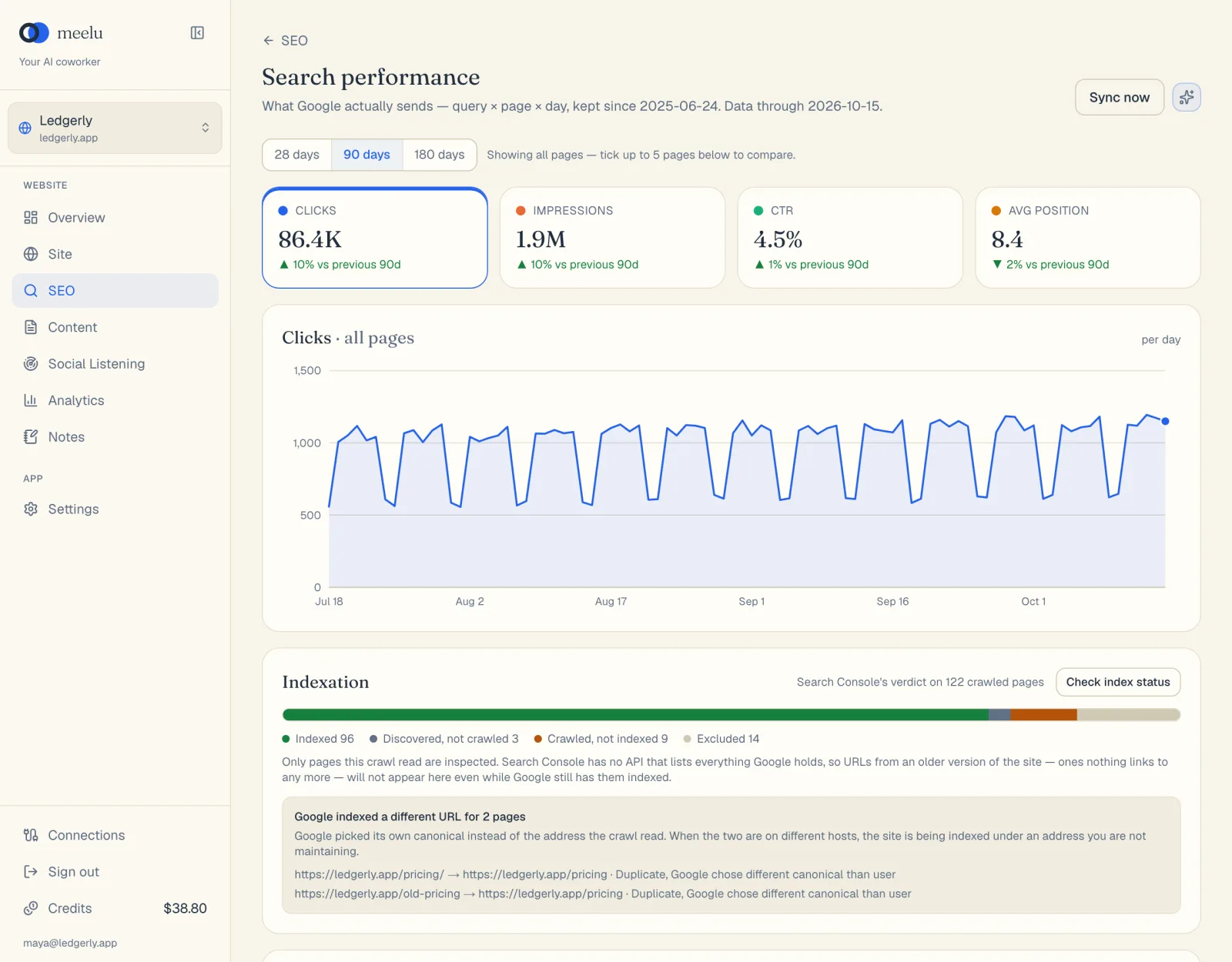
- 1Sync now fetches the latest Search Console data
- 2Pick the time range
- 3Ask Meelu
Time range and comparing pages
Choose 28 days, 90 days or 180 days at the top. Every tile, chart and table follows this choice.
By default the chart shows all pages. Tick the box next to up to five pages in the Pages table to compare them. Each selected page gets its own colour and appears as a chip at the top. Click × on a chip to remove it.
Metric tiles
Four tiles show the totals for the chosen range, and the change against the range before it:
| Tile | Meaning |
|---|---|
| Clicks | How many times searchers clicked through to your site. |
| Impressions | How many times your pages appeared in results. |
| CTR | Clicks divided by impressions. |
| Avg position | Your average spot in the results. Lower is better, so a fall in this number is good news. |
Click a tile to show that metric in the chart. The chart plots one point per day.
Low-volume warning
If your site gets very few impressions (under about 200 in the last 28 days), a yellow note says the numbers are thin. Treat ups and downs as noise until there is real volume. Meelu is told the same, so it will not read meaning into tiny changes.
Striking distance
This card lists searches where you already rank between positions 8 and 15, with at least 50 impressions in the last 28 days. These are just outside the top ten, so they are often the quickest wins.
| Column | Meaning |
|---|---|
| Query | What people searched. |
| Page | Your page that ranks for it. |
| Pos | Average position over 28 days. |
| Impressions | How often it appeared. |
| Inlinks | How many links from your own pages point to it. A needs links badge appears at two or fewer. |
The inlink count tells you what kind of push the page needs. A page with almost no internal links probably needs links from your other pages first. A page that already has many links probably needs better content. The Site desk's structure view can suggest the internal links.
Pages table
Pages · last N days lists every page Search Console reports. Click a column name to sort by it. Type in Filter pages… to find a page by its address. Use ‹ Prev and Next › to move through the list.
| Column | Meaning |
|---|---|
| Page | The page address. |
| Clicks | Clicks in the range. |
| Impr. | Impressions in the range. |
| CTR | Clicks divided by impressions. |
| Pos. | Average position. |
| Index | Google's index status for the page, such as Indexed or Not indexed. A red ≠ means Google chose a different address as the main version of this page. |
| Crawled | How long ago Google last visited the page. |
| Inspected | How long ago Meelu last checked the page's index status. |
Top queries
Top queries lists the searches that bring you clicks, with the page that ranks for each, Clicks, Impr. and Pos. When you tick pages in the Pages table, this list shows only the queries for those pages.
At the bottom of the screen, a note names the Search Console property in use. Click change in it to pick another property.
What each button does
| Button | What it does |
|---|---|
| Connect Search Console | Opens Google's sign-in in a new tab to connect your Google account. |
| Import 16 months | Runs the first sync. Shown when there is no data yet. |
| Sync now | Brings in the newest days since the last sync. Meelu also does this once a day on its own. |
| Stop sync | Stops a running sync. Days already imported are kept. |
| A property in Which Search Console property is authoritative? | Saves that property and starts a sync. |
| change (in the note at the bottom) | Shows the property list again so you can switch. |
| 28 days / 90 days / 180 days | Sets the time range for everything on the screen. |
| Clicks / Impressions / CTR / Avg position tiles | Choose which metric the chart shows. |
| Checkbox on a page row | Adds the page to the chart and filters Top queries to it. Up to five pages. |
| × on a page chip | Removes that page from the comparison. |
| Column names in the Pages table | Sort by that column. Click again to reverse. |
| Circular arrow on a page row | Re-checks that one page's index status now. |
| ‹ Prev / Next › | Page through a table. |
| Ask Meelu (sparkle icon) | Opens a task about your search data. See Asking the SEO desk. |
What to do with it
- High impressions, low CTR: people see you but do not click. Look at the page title and description for that query.
- Striking distance rows: pick the few with the most impressions and push them onto page one.
- A page lost clicks: check whether its position dropped or only its CTR, and whether it is still indexed. The Why did this page drop? prompt does this for you.